
improved
Appointments
Branch Selector for Multi-Location Businesses
We recently released an update to the branch selector to make it easier for you to switch branches and also allow you to more easily update the branches that you have access to.
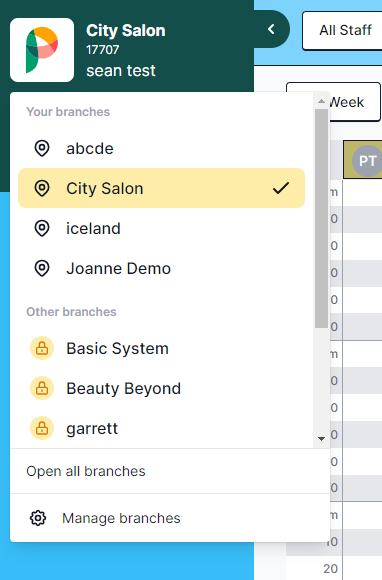
Your branches
All the branches that you currently have access to are listed in this section. Clicking on any of these locations will open that branch for you.
Other branches
Any branches that you currently do not have access to are listed in this section. Clicking on any of these locations will prompt you to enter the pin for someone who has action to the location.
Open all branches
When you click this button it will open a new browser tab for each location within the "Your branches" grouping.
Manage branches
When you click on this button it will open the branches tab for the staff member that is currently logged in. This will allow you to quickly update the branches that you have access to. If you do not have access to this section of the software you will be prompted to enter the pin of someone who does have access.
__
If you have any feedback on these updates please don't hesitate to let us know by posting feedback within this platform, or by clicking the feedback button in the bottom right hand corner of the updated appointment screen.
This version of Phorest is currently in development and beta access is available. If you would like access to it please email sean@phorest.com.